在之前的文章我們介紹了一下 Java 中的 集合框架中的Collection 的泛型,本章我們來看一下 Java 集合框架中的Collection 的子接口 List。
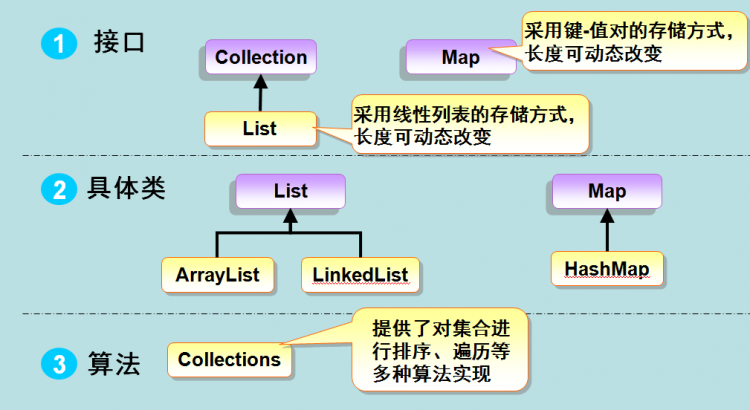
Collection 接口有 3 種子類型,List、Set 和 Queue,其中 List 和 Set 的區別是 Set 中不能存放相同的元素,而 List 中可以,本章我們就來介紹一下 List。
從上圖我們可以知道 List 有兩個實例類,ArrayList 和 LinkedList,
ArrayList 是數組實現,查找快,增上慢,由於是數組實現,在增和刪的時候牽扯到數組的增容,以及靠背元素,所以慢,數組是可以直接按索引查找,所以查找時較快。
LinkedList 是鏈表實現,增刪快,查找慢,由於鏈表實現,增加時只要讓前一個元素記住自己就可以了,刪除時讓前一個元素記住后一個元素,后一個元素記住前一個元素,這樣的增刪效率高但查詢時需要一個一個遍歷,所以效率低。
LinkedList 我們可以形象的比作老式手錶的鏈子,一節扣一節,增刪時只需要打開兩個之間的節扣即可,不需要牽扯到其他節扣。
ArrayList 和 LinkedList 都有各自的優缺點,在用的時候可以根據需求自行選擇,避免性能消耗。在現在計算機計算能力越來越強,做的也不是大型項目的時候,這兩個之間的性能差異我們其實是可以忽略的。
接下來我們就來看一下 List 接口的一些基礎用法,如下:
 1 import java.util.ArrayList;
 2 import java.util.List;
 3
 4 /**
 5  * java.util.List
 6  * 可重複集合,並且有序
 7  * 特點是可以根據下錶操作元素
 8  * ArrayList:使用數組實現,查詢更快
 9  * LinkedList:使用鏈表實現,增刪更快(收尾增刪效果更明顯)
10  */
11
12 public class Main {
13     public static void main(String[] args) {
14         List<String> list = new ArrayList<String>();
15         list.add("one");
16         list.add("two");
17         list.add("three");
18         list.add("four");
19         /**
20          * E set(int index, E e)
21          * 將給定元素設置到制定位置上,返回原位置的元素
22          * 所以是替換元素操作
23          * 如果超出了元素的長度,則使用 add 添加,否則編譯錯誤
24          * */
25         String old = list.set(1, "2"); // 將下標為 1 的元素改為 2,返回值則是被替換的元素
26         System.out.println(old); // two
27         System.out.println(list); // [one, 2, three, four]
28
29         /**
30          * E get(int index)
31          * 獲取給定下標對應的元素
32          * */
33         String two = list.get(1); // 獲取第二個元素
34         System.out.println(two); // 2
35
36         /**
37          * 可以通過傳統的循環遍歷 List 集合
38          * */
39         for (int i = 0; i < list.size(); i++) {
40             System.out.println(list.get(i)); // one 2 three four
41         }
42     }
43 }
在上面的代碼中,我們通過 set 和 get 方法來設置和獲取我們想要的下標的元素,當然還有其他方法,如下:
 1 /**
 2  * List 集合提供了一對重載的 add,remove 方法
 3  * void add(int index, E e)
 4  * 將給定元素插入到指定位置,
 5  * 如果不指定下標,則插入到末尾
 6  * <p>
 7  * E remove(int index)
 8  * 從集合中刪除指定位置的元素,並將其返回
 9  */
10
11 public class Main {
12     public static void main(String[] args) {
13         List<String> list = new ArrayList<String>();
14         list.add("one");
15         list.add("two");
16         list.add("three");
17         list.add("four");
18
19         list.add(1, "2"); // 將下標為 1 的元素插入 2
20         System.out.println(list); // [one, 2, two, three, four]
21
22         String string = list.remove(1); // 將下標為 1 的元素刪除,返回值為該元素
23         System.out.println(string); // 2
24         System.out.println(list); // [one, two, three, four]
25     }
26 }
我們在將 Collection 的時候講過 add 和 remove 方法,在 List 中這兩個方法被重載了,可以根據需求插入和刪除想要刪除的下標的元素,那如果我們想要獲取兩個下標之間的元素和刪除兩個下標之間的元素該怎麼辦呢,如下:
 1 import java.util.ArrayList;
 2 import java.util.List;
 3
 4 public class Main {
 5     public static void main(String[] args) {
 6         List<Integer> list = new ArrayList<Integer>();
 7         for (int i = 0; i < 10; i++) {
 8             list.add(i);
 9         }
10         System.out.println(list); // [0, 1, 2, 3, 4, 5, 6, 7, 8, 9]
11         List<Integer> subList = list.subList(2, 5); // 獲取下標從 2 到 5 的元素,含 2 不含 5
12         System.out.println(subList); // [2, 3, 4]
13         // 將 subList 中每個元素擴大 10 倍
14         for (int i = 0; i < subList.size(); i++) {
15             subList.set(i, subList.get(i) * 10);
16         }
17         System.out.println(subList); // [20, 30, 40]
18         /**
19          * 對子集的修改,就是修改原集合相應內容
20          * */
21         System.out.println(list); // [0, 1, 20, 30, 40, 5, 6, 7, 8, 9]
22         /**
23          * 刪除集合中 2-5 的元素
24          * */
25         list.subList(2, 5).clear();
26         System.out.println(list); // [0, 1, 5, 6, 7, 8, 9]
27     }
28 }
我們說集合和數組有很多相似的地方,那課可以進行相互轉換呢,當然是可以的,如下:
 1 import java.util.ArrayList;
 2 import java.util.Collection;
 3
 4 public class Main {
 5     public static void main(String[] args) {
 6         Collection<String> collection = new ArrayList<String>();
 7         collection.add("one");
 8         collection.add("two");
 9         collection.add("three");
10         collection.add("four");
11         System.out.println(collection); // [one, two, three, four]
12         /**
13          * 集合提供了一個 toArray,可以將當前集合轉換為數組
14          * */
15         // Object[] array = collection.toArray(); // 不常用
16         /**
17          * collection.size() 表示要轉換的數組的 length
18          * 如果大於給定的 collection 的 size,則自動填充完整 array
19          * 如果小於給定的 collection 的 size,則自動創建給你一樣長度的 size
20          * */
21         String[] array = collection.toArray(new String[collection.size()]);
22         System.out.println(array.length); // 4
23         for (String string : array) {
24             System.out.println(string); // one two three four
25         }
26
27         String[] array1 = collection.toArray(new String[6]);
28         System.out.println(array.length); // 4
29         for (String string : array1) {
30             System.out.println(string); // one two three four null null
31         }
32
33         String[] array2 = collection.toArray(new String[1]);
34         System.out.println(array.length); // 4
35         for (String string : array2) {
36             System.out.println(string); // one two three four
37         }
38     }
39 }
在上面的代碼中我們實現了集合轉換為數組的方法,接下來我們再看一下數組轉換為集合的方法:
 1 import java.util.ArrayList;
 2 import java.util.Arrays;
 3 import java.util.List;
 4
 5 /**
 6  * 數組轉換為集合
 7  * 需要注意,轉換隻能轉換為 List 集合
 8  * 使用的是數組的工具類 Arrays 的靜態方法 asList
 9  * 只能轉換為 List 集合的主要原因是:Set 不能存放重複元素
10  * 所以若轉換為 Set 集合可能會出現丟失元素的情況
11  */
12 public class Main {
13     public static void main(String[] args) {
14         String[] array = {"one", "two", "three", "four"};
15         List<String> list = Arrays.asList(array);
16         System.out.println(list); // [one, two, three, four]
17
18         /**
19          * 向集合中添加元素,會出現編譯錯誤
20          * 相當於在原數組添加元素
21          * 該集合時由數組轉換過來的,那麼該集合就表示原來的數組
22          * 所以對集合的操作就是對數組的操作
23          * 那麼添加元素會導致原數組擴容
24          * 那麼久不能表示原來的數組了
25          * 所以不允許向該集合添加元素
26          */
27         // list.add("five"); // 編譯錯誤 Exception in thread "main" java.lang.UnsupportedOperationException
28
29         /**
30          * 若希望增刪元素,需要另外創建一個集合
31          * */
32         /**
33          * 所有的集合都提供了一個帶有 Collection 類型參數的構造方法
34          * 該構造方法稱為:複製構造器
35          * 作用是在創建當前集合的同時,
36          * 集合中包含給定集合中的所有元素
37          * */
38         // List<String> list1 = new ArrayList<String>(list); // 複製構造器,一步到位
39         List<String> list1 = new ArrayList<String>();
40         list1.addAll(list);
41         list1.add("five");
42         System.out.println(list1); // [one, 2, three, four, five]
43
44         /**
45          * 修改集合元素,數組元素也會改變
46          * */
47         list.set(1, "2");
48         System.out.println(list); // [one, 2, three, four]
49         for (String string : array) {
50             System.out.println(string); // one 2 three four
51         }
52     }
53 }
本站聲明:網站內容來源於博客園,如有侵權,請聯繫我們,我們將及時處理
【其他文章推薦】
※廣告預算用在刀口上,台北網頁設計公司幫您達到更多曝光效益
※別再煩惱如何寫文案,掌握八大原則!
※教你寫出一流的銷售文案?
※超省錢租車方案
※FB行銷專家,教你從零開始的技巧
※聚甘新