前面我們聊到了mariadb的事務,以及事務隔離級別,回顧請參考https://www.cnblogs.com/qiuhom-1874/p/13198186.html;今天我們來聊一聊mariadb的日誌相關話題;mariadb日誌有6種,分別是查詢日誌(general_log),慢查詢日誌(log_slow_queries),錯誤日誌(log_error,log_warnings),二進制日誌(binlog),中繼日誌(relay_log)和事務日誌(innodb_log);
1、查詢日誌,主要記錄查詢語句,日誌存儲位置可放在表中,也可以放在文件中,這個要根據自己的配置,當然也可以同時放在表和文件中;一般情況服務器IO壓力不大的情況下是可以開啟查詢日誌的,如果服務器IO壓力大,建議不要開啟查詢日誌;具體配置方法如下
把查詢日誌放在mysql庫的general_log 表中的配置方法:
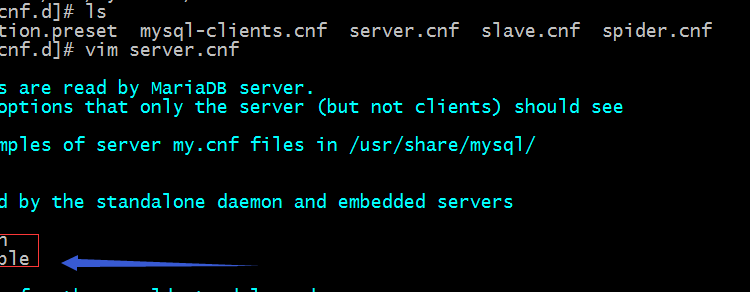
在/etc/my.cnf.d/server.cnf中的server配置段下添加如下配置,並重啟mariadb服務即可
提示:以上配置表示開啟查詢日誌,日誌輸出到表;默認會把查詢日誌存放在mysql庫中的general_log表中;
重啟服務,然後查看general_log表是否有數據?
[root@lxc my.cnf.d]# systemctl restart mariadb
[root@lxc my.cnf.d]# mysql
Welcome to the MariaDB monitor.  Commands end with ; or \g.
Your MariaDB connection id is 3
Server version: 10.5.4-MariaDB-log MariaDB Server

Copyright (c) 2000, 2018, Oracle, MariaDB Corporation Ab and others.

Type 'help;' or '\h' for help. Type '\c' to clear the current input statement.

MariaDB [(none)]> use mysql
Reading table information for completion of table and column names
You can turn off this feature to get a quicker startup with -A

Database changed
MariaDB [mysql]> select * from mysql.general_log ;
+----------------------------+---------------------------+-----------+-----------+--------------+----------------------------------+
| event_time                 | user_host                 | thread_id | server_id | command_type | argument                         |
+----------------------------+---------------------------+-----------+-----------+--------------+----------------------------------+
| 2020-06-28 09:14:33.402211 | [root] @ localhost []     |         3 |         3 | Connect      | root@localhost on  using Socket  |
| 2020-06-28 09:14:33.409731 | root[root] @ localhost [] |         3 |         3 | Query        | select @@version_comment limit 1 |
| 2020-06-28 09:14:38.087307 | root[root] @ localhost [] |         3 |         3 | Query        | SELECT DATABASE()                |
| 2020-06-28 09:14:38.087952 | root[root] @ localhost [] |         3 |         3 | Init DB      | mysql                            |
| 2020-06-28 09:14:38.091356 | root[root] @ localhost [] |         3 |         3 | Query        | show databases                   |
| 2020-06-28 09:14:38.092713 | root[root] @ localhost [] |         3 |         3 | Query        | show tables                      |
| 2020-06-28 09:14:38.094222 | root[root] @ localhost [] |         3 |         3 | Field List   | column_stats                     |
| 2020-06-28 09:14:38.095628 | root[root] @ localhost [] |         3 |         3 | Field List   | columns_priv                     |
| 2020-06-28 09:14:38.096401 | root[root] @ localhost [] |         3 |         3 | Field List   | db                               |
| 2020-06-28 09:14:38.097869 | root[root] @ localhost [] |         3 |         3 | Field List   | event                            |
| 2020-06-28 09:14:38.099603 | root[root] @ localhost [] |         3 |         3 | Field List   | func                             |
| 2020-06-28 09:14:38.100382 | root[root] @ localhost [] |         3 |         3 | Field List   | general_log                      |
| 2020-06-28 09:14:38.101266 | root[root] @ localhost [] |         3 |         3 | Field List   | global_priv                      |
| 2020-06-28 09:14:38.101867 | root[root] @ localhost [] |         3 |         3 | Field List   | gtid_slave_pos                   |
| 2020-06-28 09:14:38.102563 | root[root] @ localhost [] |         3 |         3 | Field List   | help_category                    |
| 2020-06-28 09:14:38.103556 | root[root] @ localhost [] |         3 |         3 | Field List   | help_keyword                     |
| 2020-06-28 09:14:38.104430 | root[root] @ localhost [] |         3 |         3 | Field List   | help_relation                    |
| 2020-06-28 09:14:38.105328 | root[root] @ localhost [] |         3 |         3 | Field List   | help_topic                       |
| 2020-06-28 09:14:38.106362 | root[root] @ localhost [] |         3 |         3 | Field List   | index_stats                      |
| 2020-06-28 09:14:38.107459 | root[root] @ localhost [] |         3 |         3 | Field List   | innodb_index_stats               |
| 2020-06-28 09:14:38.109085 | root[root] @ localhost [] |         3 |         3 | Field List   | innodb_table_stats               |
| 2020-06-28 09:14:38.110367 | root[root] @ localhost [] |         3 |         3 | Field List   | plugin                           |
| 2020-06-28 09:14:38.111098 | root[root] @ localhost [] |         3 |         3 | Field List   | proc                             |
| 2020-06-28 09:14:38.112958 | root[root] @ localhost [] |         3 |         3 | Field List   | procs_priv                       |
| 2020-06-28 09:14:38.113798 | root[root] @ localhost [] |         3 |         3 | Field List   | proxies_priv                     |
| 2020-06-28 09:14:38.114734 | root[root] @ localhost [] |         3 |         3 | Field List   | roles_mapping                    |
| 2020-06-28 09:14:38.115476 | root[root] @ localhost [] |         3 |         3 | Field List   | servers                          |
| 2020-06-28 09:14:38.116419 | root[root] @ localhost [] |         3 |         3 | Field List   | slow_log                         |
| 2020-06-28 09:14:38.118138 | root[root] @ localhost [] |         3 |         3 | Field List   | table_stats                      |
| 2020-06-28 09:14:38.119065 | root[root] @ localhost [] |         3 |         3 | Field List   | tables_priv                      |
| 2020-06-28 09:14:38.120027 | root[root] @ localhost [] |         3 |         3 | Field List   | time_zone                        |
| 2020-06-28 09:14:38.120907 | root[root] @ localhost [] |         3 |         3 | Field List   | time_zone_leap_second            |
| 2020-06-28 09:14:38.121914 | root[root] @ localhost [] |         3 |         3 | Field List   | time_zone_name                   |
| 2020-06-28 09:14:38.122718 | root[root] @ localhost [] |         3 |         3 | Field List   | time_zone_transition             |
| 2020-06-28 09:14:38.123713 | root[root] @ localhost [] |         3 |         3 | Field List   | time_zone_transition_type        |
| 2020-06-28 09:14:38.124958 | root[root] @ localhost [] |         3 |         3 | Field List   | transaction_registry             |
| 2020-06-28 09:14:38.126722 | root[root] @ localhost [] |         3 |         3 | Field List   | user                             |
| 2020-06-28 09:14:48.615477 | root[root] @ localhost [] |         3 |         3 | Query        | select * from mysql.general_log  |
+----------------------------+---------------------------+-----------+-----------+--------------+----------------------------------+
38 rows in set (0.002 sec)

MariaDB [mysql]>
提示:可以看到重啟服務后,general_log表中就有數據了,此時查詢日誌記錄到表中就配置好了;通常不建議開啟查詢日誌,這個很消耗服務器性能;
配置查詢日誌記錄到文件
提示:以上配置表示明確開啟查詢日誌,並把日誌記錄到/var/lib/mysql/general_log中;
重啟服務,看看對應目錄下是否生成日誌文件,連接到數據,執行查詢操作,看看是否把日誌記錄到相應文件中哦?
[root@lxc my.cnf.d]# systemctl restart mariadb
[root@lxc my.cnf.d]# ll /var/lib/mysql/general_log
-rw-rw---- 1 mysql mysql 143 Jun 28 09:22 /var/lib/mysql/general_log
[root@lxc my.cnf.d]# cat /var/lib/mysql/general_log
/usr/sbin/mariadbd, Version: 10.5.4-MariaDB-log (MariaDB Server). started with:
Tcp port: 0  Unix socket: (null)
Time                Id Command  Argument
[root@lxc my.cnf.d]# mysql
Welcome to the MariaDB monitor.  Commands end with ; or \g.
Your MariaDB connection id is 3
Server version: 10.5.4-MariaDB-log MariaDB Server

Copyright (c) 2000, 2018, Oracle, MariaDB Corporation Ab and others.

Type 'help;' or '\h' for help. Type '\c' to clear the current input statement.

MariaDB [(none)]> show databases;
+--------------------+
| Database           |
+--------------------+
| first_db           |
| information_schema |
| mysql              |
| performance_schema |
| test               |
+--------------------+
5 rows in set (0.001 sec)

MariaDB [(none)]> \q
Bye
[root@lxc my.cnf.d]# cat /var/lib/mysql/general_log
/usr/sbin/mariadbd, Version: 10.5.4-MariaDB-log (MariaDB Server). started with:
Tcp port: 0  Unix socket: (null)
Time                Id Command  Argument
200628  9:22:32      3 Connect  root@localhost on  using Socket
                     3 Query    select @@version_comment limit 1
200628  9:22:37      3 Query    show databases
200628  9:22:38      3 Quit
[root@lxc my.cnf.d]#
提示:可以看到我們在數據庫中執行了一個show databases; 在對應日誌文件中是能夠記錄對應語句的;
配置查詢日誌記錄同時記錄到表和文件中
提示:以上配置表示開啟查詢日誌功能,並把日誌同時記錄到表和文件中,文件路徑為/var/lib/mysq/general_log;
重啟mariadb,執行查詢操作,看看對應表和文件中是否有記錄?
[root@lxc my.cnf.d]# systemctl restart mariadb
[root@lxc my.cnf.d]# mysql
Welcome to the MariaDB monitor.  Commands end with ; or \g.
Your MariaDB connection id is 3
Server version: 10.5.4-MariaDB-log MariaDB Server

Copyright (c) 2000, 2018, Oracle, MariaDB Corporation Ab and others.

Type 'help;' or '\h' for help. Type '\c' to clear the current input statement.

MariaDB [(none)]> select * from mysql.general_log;
+----------------------------+---------------------------+-----------+-----------+--------------+----------------------------------+
| event_time                 | user_host                 | thread_id | server_id | command_type | argument                         |
+----------------------------+---------------------------+-----------+-----------+--------------+----------------------------------+
| 2020-06-28 09:14:33.402211 | [root] @ localhost []     |         3 |         3 | Connect      | root@localhost on  using Socket  |
| 2020-06-28 09:14:33.409731 | root[root] @ localhost [] |         3 |         3 | Query        | select @@version_comment limit 1 |
| 2020-06-28 09:14:38.087307 | root[root] @ localhost [] |         3 |         3 | Query        | SELECT DATABASE()                |
| 2020-06-28 09:14:38.087952 | root[root] @ localhost [] |         3 |         3 | Init DB      | mysql                            |
| 2020-06-28 09:14:38.091356 | root[root] @ localhost [] |         3 |         3 | Query        | show databases                   |
| 2020-06-28 09:14:38.092713 | root[root] @ localhost [] |         3 |         3 | Query        | show tables                      |
| 2020-06-28 09:14:38.094222 | root[root] @ localhost [] |         3 |         3 | Field List   | column_stats                     |
| 2020-06-28 09:14:38.095628 | root[root] @ localhost [] |         3 |         3 | Field List   | columns_priv                     |
| 2020-06-28 09:14:38.096401 | root[root] @ localhost [] |         3 |         3 | Field List   | db                               |
| 2020-06-28 09:14:38.097869 | root[root] @ localhost [] |         3 |         3 | Field List   | event                            |
| 2020-06-28 09:14:38.099603 | root[root] @ localhost [] |         3 |         3 | Field List   | func                             |
| 2020-06-28 09:14:38.100382 | root[root] @ localhost [] |         3 |         3 | Field List   | general_log                      |
| 2020-06-28 09:14:38.101266 | root[root] @ localhost [] |         3 |         3 | Field List   | global_priv                      |
| 2020-06-28 09:14:38.101867 | root[root] @ localhost [] |         3 |         3 | Field List   | gtid_slave_pos                   |
| 2020-06-28 09:14:38.102563 | root[root] @ localhost [] |         3 |         3 | Field List   | help_category                    |
| 2020-06-28 09:14:38.103556 | root[root] @ localhost [] |         3 |         3 | Field List   | help_keyword                     |
| 2020-06-28 09:14:38.104430 | root[root] @ localhost [] |         3 |         3 | Field List   | help_relation                    |
| 2020-06-28 09:14:38.105328 | root[root] @ localhost [] |         3 |         3 | Field List   | help_topic                       |
| 2020-06-28 09:14:38.106362 | root[root] @ localhost [] |         3 |         3 | Field List   | index_stats                      |
| 2020-06-28 09:14:38.107459 | root[root] @ localhost [] |         3 |         3 | Field List   | innodb_index_stats               |
| 2020-06-28 09:14:38.109085 | root[root] @ localhost [] |         3 |         3 | Field List   | innodb_table_stats               |
| 2020-06-28 09:14:38.110367 | root[root] @ localhost [] |         3 |         3 | Field List   | plugin                           |
| 2020-06-28 09:14:38.111098 | root[root] @ localhost [] |         3 |         3 | Field List   | proc                             |
| 2020-06-28 09:14:38.112958 | root[root] @ localhost [] |         3 |         3 | Field List   | procs_priv                       |
| 2020-06-28 09:14:38.113798 | root[root] @ localhost [] |         3 |         3 | Field List   | proxies_priv                     |
| 2020-06-28 09:14:38.114734 | root[root] @ localhost [] |         3 |         3 | Field List   | roles_mapping                    |
| 2020-06-28 09:14:38.115476 | root[root] @ localhost [] |         3 |         3 | Field List   | servers                          |
| 2020-06-28 09:14:38.116419 | root[root] @ localhost [] |         3 |         3 | Field List   | slow_log                         |
| 2020-06-28 09:14:38.118138 | root[root] @ localhost [] |         3 |         3 | Field List   | table_stats                      |
| 2020-06-28 09:14:38.119065 | root[root] @ localhost [] |         3 |         3 | Field List   | tables_priv                      |
| 2020-06-28 09:14:38.120027 | root[root] @ localhost [] |         3 |         3 | Field List   | time_zone                        |
| 2020-06-28 09:14:38.120907 | root[root] @ localhost [] |         3 |         3 | Field List   | time_zone_leap_second            |
| 2020-06-28 09:14:38.121914 | root[root] @ localhost [] |         3 |         3 | Field List   | time_zone_name                   |
| 2020-06-28 09:14:38.122718 | root[root] @ localhost [] |         3 |         3 | Field List   | time_zone_transition             |
| 2020-06-28 09:14:38.123713 | root[root] @ localhost [] |         3 |         3 | Field List   | time_zone_transition_type        |
| 2020-06-28 09:14:38.124958 | root[root] @ localhost [] |         3 |         3 | Field List   | transaction_registry             |
| 2020-06-28 09:14:38.126722 | root[root] @ localhost [] |         3 |         3 | Field List   | user                             |
| 2020-06-28 09:14:48.615477 | root[root] @ localhost [] |         3 |         3 | Query        | select * from mysql.general_log  |
| 2020-06-28 09:19:46.865108 | root[root] @ localhost [] |         3 |         3 | Quit         |                                  |
| 2020-06-28 09:28:29.542343 | [root] @ localhost []     |         3 |         3 | Connect      | root@localhost on  using Socket  |
| 2020-06-28 09:28:29.549997 | root[root] @ localhost [] |         3 |         3 | Query        | select @@version_comment limit 1 |
| 2020-06-28 09:28:44.924061 | root[root] @ localhost [] |         3 |         3 | Query        | select * from mysql.general_log  |
+----------------------------+---------------------------+-----------+-----------+--------------+----------------------------------+
42 rows in set (0.002 sec)

MariaDB [(none)]> \q
Bye
[root@lxc my.cnf.d]# cat /var/lib/mysql/general_log
/usr/sbin/mariadbd, Version: 10.5.4-MariaDB-log (MariaDB Server). started with:
Tcp port: 0  Unix socket: (null)
Time                Id Command  Argument
200628  9:22:32      3 Connect  root@localhost on  using Socket
                     3 Query    select @@version_comment limit 1
200628  9:22:37      3 Query    show databases
200628  9:22:38      3 Quit
/usr/sbin/mariadbd, Version: 10.5.4-MariaDB-log (MariaDB Server). started with:
Tcp port: 0  Unix socket: (null)
Time                Id Command  Argument
200628  9:28:29      3 Connect  root@localhost on  using Socket
                     3 Query    select @@version_comment limit 1
200628  9:28:44      3 Query    select * from mysql.general_log
200628  9:28:47      3 Quit
[root@lxc my.cnf.d]#
提示:可以看到mysql.general_log表中和/var/lib/mysql/general_log文件中是可以記錄我們執行的查詢語句;
2、慢查詢日誌,這個日誌對於運維來講是比較重要的,通常我們可以利用慢查詢日誌來判斷哪些語句執行時間超出指定時間;慢查詢日誌主要記錄運行時間超出指定時長度查詢語句;這個日誌同查詢日誌類似,它也是可以存儲在表和文件中的;具體配置方式如下
配置慢查詢日誌存放在表中
提示:以上配置表示開啟慢查詢日誌,並把日誌記錄到表中,默認是mysql.slow_log表中;log_slow_filter用來定義過濾哪些語句不記錄的;log_slow_rate_limit表示開啟慢查詢日誌記錄速率;log_slow_verbosity開啟慢查詢日誌詳細記錄;long_query_time定義時長,超出我們指定的時長就會視為慢查詢;配置好以上配置以後重啟服務,我們就可以在mariadb中看到對應變量的值;
[root@lxc my.cnf.d]# systemctl restart mariadb;
[root@lxc my.cnf.d]# mysql
Welcome to the MariaDB monitor.  Commands end with ; or \g.
Your MariaDB connection id is 3
Server version: 10.5.4-MariaDB-log MariaDB Server

Copyright (c) 2000, 2018, Oracle, MariaDB Corporation Ab and others.

Type 'help;' or '\h' for help. Type '\c' to clear the current input statement.

MariaDB [(none)]> show global variables like 'slow%';
+---------------------+--------------+
| Variable_name       | Value        |
+---------------------+--------------+
| slow_launch_time    | 2            |
| slow_query_log      | ON           |
| slow_query_log_file | lxc-slow.log |
+---------------------+--------------+
3 rows in set (0.003 sec)

MariaDB [(none)]> show global variables like 'log_slow%';
+------------------------------+--------------------------------------------------------------------------------------------------------------------------------------+
| Variable_name                | Value                                                                                                                                |
+------------------------------+--------------------------------------------------------------------------------------------------------------------------------------+
| log_slow_admin_statements    | ON                                                                                                                                   |
| log_slow_disabled_statements | sp                                                                                                                                   |
| log_slow_filter              | admin,filesort,filesort_on_disk,filesort_priority_queue,full_join,full_scan,query_cache,query_cache_miss,tmp_table,tmp_table_on_disk |
| log_slow_rate_limit          | 1                                                                                                                                    |
| log_slow_slave_statements    | ON                                                                                                                                   |
| log_slow_verbosity           | innodb                                                                                                                               |
+------------------------------+--------------------------------------------------------------------------------------------------------------------------------------+
6 rows in set (0.002 sec)

MariaDB [(none)]> show global variables like 'long%';
+-----------------+----------+
| Variable_name   | Value    |
+-----------------+----------+
| long_query_time | 3.000000 |
+-----------------+----------+
1 row in set (0.003 sec)

MariaDB [(none)]>
提示:從上面的信息可以看到我們配置的相關參數已經生效;
測試:執行select sleep(5);看看mysql.slow_log表中是否有記錄?
MariaDB [(none)]> select sleep(5) ;
+----------+
| sleep(5) |
+----------+
|        0 |
+----------+
1 row in set (5.001 sec)

MariaDB [(none)]> select * from mysql.slow_log\G
*************************** 1. row ***************************
    start_time: 2020-06-28 10:32:19.643885
     user_host: root[root] @ localhost []
    query_time: 00:00:05.000700
     lock_time: 00:00:00.000000
     rows_sent: 1
 rows_examined: 0
            db:
last_insert_id: 0
     insert_id: 0
     server_id: 3
      sql_text: select sleep(5)
     thread_id: 3
 rows_affected: 0
1 row in set (0.001 sec)

MariaDB [(none)]>
提示:可以看到slow_log表中已經記錄了我們執行的select sleep(5)語句,執行時長為5.007秒;
配置慢查詢日誌記錄到文件;
提示:以上配置表示把慢查詢日誌保存在/var/lib/mysql/slow_query_log文件中;
測試:重啟mariadb,執行select sleep(5)語句,看看對應文件是否記錄?
[root@lxc my.cnf.d]# systemctl restart mariadb
[root@lxc my.cnf.d]# ll /var/lib/mysql/slow_query_log
-rw-rw---- 1 mysql mysql 143 Jun 28 10:39 /var/lib/mysql/slow_query_log
[root@lxc my.cnf.d]# mysql
Welcome to the MariaDB monitor.  Commands end with ; or \g.
Your MariaDB connection id is 3
Server version: 10.5.4-MariaDB-log MariaDB Server

Copyright (c) 2000, 2018, Oracle, MariaDB Corporation Ab and others.

Type 'help;' or '\h' for help. Type '\c' to clear the current input statement.

MariaDB [(none)]> show global variables like 'slow%';
+---------------------+-------------------------------+
| Variable_name       | Value                         |
+---------------------+-------------------------------+
| slow_launch_time    | 2                             |
| slow_query_log      | ON                            |
| slow_query_log_file | /var/lib/mysql/slow_query_log |
+---------------------+-------------------------------+
3 rows in set (0.003 sec)

MariaDB [(none)]> show global variables like 'log_slow%';
+------------------------------+--------------------------------------------------------------------------------------------------------------------------------------+
| Variable_name                | Value                                                                                                                                |
+------------------------------+--------------------------------------------------------------------------------------------------------------------------------------+
| log_slow_admin_statements    | ON                                                                                                                                   |
| log_slow_disabled_statements | sp                                                                                                                                   |
| log_slow_filter              | admin,filesort,filesort_on_disk,filesort_priority_queue,full_join,full_scan,query_cache,query_cache_miss,tmp_table,tmp_table_on_disk |
| log_slow_rate_limit          | 1                                                                                                                                    |
| log_slow_slave_statements    | ON                                                                                                                                   |
| log_slow_verbosity           | innodb                                                                                                                               |
+------------------------------+--------------------------------------------------------------------------------------------------------------------------------------+
6 rows in set (0.003 sec)

MariaDB [(none)]> show global variables like 'long%';
+-----------------+----------+
| Variable_name   | Value    |
+-----------------+----------+
| long_query_time | 3.000000 |
+-----------------+----------+
1 row in set (0.002 sec)

MariaDB [(none)]> select sleep(5);
+----------+
| sleep(5) |
+----------+
|        0 |
+----------+
1 row in set (5.001 sec)

MariaDB [(none)]> \q
Bye
[root@lxc my.cnf.d]# cat /var/lib/mysql/slow_query_log
/usr/sbin/mariadbd, Version: 10.5.4-MariaDB-log (MariaDB Server). started with:
Tcp port: 0  Unix socket: (null)
Time                Id Command  Argument
# Time: 200628 10:40:50
# User@Host: root[root] @ localhost []
# Thread_id: 3  Schema:   QC_hit: No
# Query_time: 5.000553  Lock_time: 0.000000  Rows_sent: 1  Rows_examined: 0
# Rows_affected: 0  Bytes_sent: 64
SET timestamp=1593355250;
select sleep(5);
[root@lxc my.cnf.d]#
提示:可以看到我們配置的參數在mariadb中已經可正常查詢到,對應的文件中已經記錄我們執行select sleep(5)這條語句執行了5.000553秒;
配置慢查詢日誌記錄到表和文件中
提示:紅框中的內容表示把慢查詢日誌同時記錄到文件和表中;
測試:重啟mariadb服務,執行select sleep(5)語句看看是否在表和文件中都記錄了?
[root@lxc my.cnf.d]# systemctl restart mariadb
[root@lxc my.cnf.d]# mysql
Welcome to the MariaDB monitor.  Commands end with ; or \g.
Your MariaDB connection id is 3
Server version: 10.5.4-MariaDB-log MariaDB Server

Copyright (c) 2000, 2018, Oracle, MariaDB Corporation Ab and others.

Type 'help;' or '\h' for help. Type '\c' to clear the current input statement.

MariaDB [(none)]> select sleep(5);
+----------+
| sleep(5) |
+----------+
|        0 |
+----------+
1 row in set (5.002 sec)

MariaDB [(none)]> select * from mysql.slow_log\G
*************************** 1. row ***************************
    start_time: 2020-06-28 10:32:19.643885
     user_host: root[root] @ localhost []
    query_time: 00:00:05.000700
     lock_time: 00:00:00.000000
     rows_sent: 1
 rows_examined: 0
            db:
last_insert_id: 0
     insert_id: 0
     server_id: 3
      sql_text: select sleep(5)
     thread_id: 3
 rows_affected: 0
*************************** 2. row ***************************
    start_time: 2020-06-28 10:45:37.720365
     user_host: root[root] @ localhost []
    query_time: 00:00:05.000784
     lock_time: 00:00:00.000000
     rows_sent: 1
 rows_examined: 0
            db:
last_insert_id: 0
     insert_id: 0
     server_id: 3
      sql_text: select sleep(5)
     thread_id: 3
 rows_affected: 0
2 rows in set (0.001 sec)

MariaDB [(none)]> \q
Bye
[root@lxc my.cnf.d]# cat /var/lib/mysql/slow_query_log
/usr/sbin/mariadbd, Version: 10.5.4-MariaDB-log (MariaDB Server). started with:
Tcp port: 0  Unix socket: (null)
Time                Id Command  Argument
# Time: 200628 10:40:50
# User@Host: root[root] @ localhost []
# Thread_id: 3  Schema:   QC_hit: No
# Query_time: 5.000553  Lock_time: 0.000000  Rows_sent: 1  Rows_examined: 0
# Rows_affected: 0  Bytes_sent: 64
SET timestamp=1593355250;
select sleep(5);
/usr/sbin/mariadbd, Version: 10.5.4-MariaDB-log (MariaDB Server). started with:
Tcp port: 0  Unix socket: (null)
Time                Id Command  Argument
# Time: 200628 10:45:37
# User@Host: root[root] @ localhost []
# Thread_id: 3  Schema:   QC_hit: No
# Query_time: 5.000784  Lock_time: 0.000000  Rows_sent: 1  Rows_examined: 0
# Rows_affected: 0  Bytes_sent: 64
SET timestamp=1593355537;
select sleep(5);
[root@lxc my.cnf.d]#
提示:可以看到slow_log表和我們指定文件中都記錄;
用mysqldumpslow來統計慢查詢日誌
[root@lxc my.cnf.d]# mysqldumpslow
Can't determine datadir from 'my_print_defaults instances' output: --slow_query_log=on
--log_output=file,table
--slow_query_log_file=/var/lib/mysql/slow_query_log
--log_slow_filter=admin,filesort,filesort_on_disk,filesort_priority_queue,full_join,full_scan,query_cache,query_cache_miss,tmp_table,tmp_table_on_disk
--log_slow_rate_limit=1
--log_slow_verbosity=1
--long_query_time=3
--server_id=3
--read_only
--relay_log_purge=0
--skip_name_resolve=1
[root@lxc my.cnf.d]# mysqldumpslow /var/lib/mysql/slow_query_log

Reading mysql slow query log from /var/lib/mysql/slow_query_log
Count: 2  Time=5.00s (10s)  Lock=0.00s (0s)  Rows_sent=1.0 (2), Rows_examined=0.0 (0), Rows_affected=0.0 (0), root[root]@localhost
  select sleep(N)

Count: 1  Time=4.02s (4s)  Lock=0.00s (0s)  Rows_sent=1.0 (1), Rows_examined=2.0 (2), Rows_affected=0.0 (0), root[root]@localhost
  select sleep(N),count(id) from first_db.test_tb

Count: 3  Time=4.00s (12s)  Lock=0.00s (0s)  Rows_sent=1.0 (3), Rows_examined=5.0 (15), Rows_affected=0.0 (0), root[root]@localhost
  select sleep(N),count(start_time) from mysql.slow_log

Count: 1  Time=4.00s (4s)  Lock=0.00s (0s)  Rows_sent=1.0 (1), Rows_examined=0.0 (0), Rows_affected=0.0 (0), root[root]@localhost
  select sleep(N)as a, N as b

[root@lxc my.cnf.d]#
提示:默認mysqldumpslow 不加任何選項和參數 它會打印配置文件內容,mysqldumpslow 後面給指定的slow日誌 它會統計出那些命令執行了幾次,總時長是多少等等;
使用日誌分析工具mysqlsla工具分析慢查詢日誌
安裝mysqlsla
[root@lxc my.cnf.d]# yum install perl-DBI perl-DBD-MySQL perl-devel -y
Loaded plugins: fastestmirror
base                                                                                                                                                | 3.6 kB  00:00:00
docker-ce-stable                                                                                                                                    | 3.5 kB  00:00:00
epel                                                                                                                                                | 4.7 kB  00:00:00
extras                                                                                                                                              | 2.9 kB  00:00:00
mariadb-main                                                                                                                                        | 2.9 kB  00:00:00
mariadb-maxscale                                                                                                                                    | 2.4 kB  00:00:00
mariadb-tools                                                                                                                                       | 2.9 kB  00:00:00
updates                                                                                                                                             | 2.9 kB  00:00:00
(1/3): updates/7/x86_64/primary_db                                                                                                                  | 2.9 MB  00:00:00
(2/3): epel/x86_64/updateinfo                                                                                                                       | 1.0 MB  00:00:00
(3/3): epel/x86_64/primary_db                                                                                                                       | 6.8 MB  00:00:01
Loading mirror speeds from cached hostfile
 * base: mirrors.aliyun.com
 * extras: mirrors.aliyun.com
 * updates: mirrors.aliyun.com
Package perl-DBI-1.627-4.el7.x86_64 already installed and latest version
Resolving Dependencies
--> Running transaction check
---> Package perl-DBD-MySQL.x86_64 0:4.023-5.el7 will be updated
---> Package perl-DBD-MySQL.x86_64 0:4.023-6.el7 will be an update
---> Package perl-devel.x86_64 4:5.16.3-295.el7 will be installed
……省略部分內容
Installed:
  perl-devel.x86_64 4:5.16.3-295.el7

Dependency Installed:
  gdbm-devel.x86_64 0:1.10-8.el7                           glibc-devel.x86_64 0:2.17-307.el7.1                      glibc-headers.x86_64 0:2.17-307.el7.1
  kernel-headers.x86_64 0:3.10.0-1127.13.1.el7             libdb-devel.x86_64 0:5.3.21-25.el7                       perl-ExtUtils-Install.noarch 0:1.58-295.el7
  perl-ExtUtils-MakeMaker.noarch 0:6.68-3.el7              perl-ExtUtils-Manifest.noarch 0:1.61-244.el7             perl-ExtUtils-ParseXS.noarch 1:3.18-3.el7
  perl-Test-Harness.noarch 0:3.28-3.el7                    pyparsing.noarch 0:1.5.6-9.el7                           systemtap-sdt-devel.x86_64 0:4.0-11.el7

Updated:
  perl-DBD-MySQL.x86_64 0:4.023-6.el7

Dependency Updated:
  glibc.x86_64 0:2.17-307.el7.1          glibc-common.x86_64 0:2.17-307.el7.1          libdb.x86_64 0:5.3.21-25.el7          libdb-utils.x86_64 0:5.3.21-25.el7

Complete!
[root@lxc my.cnf.d]#cd
[root@lxc ~]#wget  ftp://ftp.tw.freebsd.org/pub/distfiles/mysqlsla-2.03.tar.gz
--2020-06-28 11:07:02--  ftp://ftp.tw.freebsd.org/pub/distfiles/mysqlsla-2.03.tar.gz
           => ‘mysqlsla-2.03.tar.gz’
Resolving ftp.tw.freebsd.org (ftp.tw.freebsd.org)... 140.113.17.209
Connecting to ftp.tw.freebsd.org (ftp.tw.freebsd.org)|140.113.17.209|:21... connected.
Logging in as anonymous ... Logged in!
==> SYST ... done.    ==> PWD ... done.
==> TYPE I ... done.  ==> CWD (1) /pub/distfiles ... done.
==> SIZE mysqlsla-2.03.tar.gz ... 33674
==> PASV ... done.    ==> RETR mysqlsla-2.03.tar.gz ... done.
Length: 33674 (33K) (unauthoritative)

100%[=================================================================================================================================>] 33,674      --.-K/s   in 0s

2020-06-28 11:07:10 (195 MB/s) - ‘mysqlsla-2.03.tar.gz’ saved [33674]
[root@lxc ~]# ls
192.168.0.22  lxc_br_set.sh  LXC-Web-Panel  mysqlsla-2.03.tar.gz
[root@lxc ~]# tar xf mysqlsla-2.03.tar.gz
[root@lxc ~]# cd mysqlsla-2.03/
[root@lxc mysqlsla-2.03]# perl Makefile.PL
Checking if your kit is complete...
Looks good
Writing Makefile for mysqlsla
[root@lxc mysqlsla-2.03]# make
cp lib/mysqlsla.pm blib/lib/mysqlsla.pm
cp bin/mysqlsla blib/script/mysqlsla
/usr/bin/perl -MExtUtils::MY -e 'MY->fixin(shift)' -- blib/script/mysqlsla
Manifying blib/man3/mysqlsla.3pm
[root@lxc mysqlsla-2.03]# make install
Installing /usr/local/share/perl5/mysqlsla.pm
Installing /usr/local/share/man/man3/mysqlsla.3pm
Installing /usr/local/bin/mysqlsla
Appending installation info to /usr/lib64/perl5/perllocal.pod
[root@lxc mysqlsla-2.03]#
使用mysqlsla分析慢查詢日誌/var/lib/mysql/slow_query_log
[root@lxc mysqlsla-2.03]# mysqlsla -lt slow /var/lib/mysql/slow_query_log
Report for msl logs: /var/lib/mysql/slow_query_log
7 queries total, 4 unique
Sorted by 't_sum'
Grand Totals: Time 30 s, Lock 0 s, Rows sent 7, Rows Examined 17


______________________________________________________________________ 001 ___
Count         : 3  (42.86%)
Time          : 12.003227 s total, 4.001076 s avg, 4.000803 s to 4.001615 s max  (39.97%)
Lock Time (s) : 595 otal, 198 vg, 151 o 257 ax  (26.81%)
Rows sent     : 1 avg, 1 to 1 max  (42.86%)
Rows examined : 5 avg, 4 to 6 max  (88.24%)
Database      :   QC_hit: No
Users         :
        root@localhost  : 100.00% (3) of query, 100.00% (7) of all users

Query abstract:
SELECT sleep(N),COUNT(start_time) FROM mysql.slow_log;

Query sample:
select sleep(4),count(start_time) from mysql.slow_log;

______________________________________________________________________ 002 ___
Count         : 2  (28.57%)
Time          : 10.001337 s total, 5.000668 s avg, 5.000553 s to 5.000784 s max  (33.31%)
Lock Time (s) : 0 total, 0 avg, 0 to 0 max  (0.00%)
Rows sent     : 1 avg, 1 to 1 max  (28.57%)
Rows examined : 0 avg, 0 to 0 max  (0.00%)
Database      :   QC_hit: No
Users         :
        root@localhost  : 100.00% (2) of query, 100.00% (7) of all users

Query abstract:
SELECT sleep(N);

Query sample:
select sleep(5);

______________________________________________________________________ 003 ___
Count         : 1  (14.29%)
Time          : 4.023146 s total, 4.023146 s avg, 4.023146 s to 4.023146 s max  (13.40%)
Lock Time (s) : 1.624 ms total, 1.624 ms avg, 1.624 ms to 1.624 ms max  (73.19%)
Rows sent     : 1 avg, 1 to 1 max  (14.29%)
Rows examined : 2 avg, 2 to 2 max  (11.76%)
Database      :   QC_hit: No
Users         :
        root@localhost  : 100.00% (1) of query, 100.00% (7) of all users

Query abstract:
SELECT sleep(N),COUNT(id) FROM first_db.test_tb;

Query sample:
select sleep(4),count(id) from first_db.test_tb;

______________________________________________________________________ 004 ___
Count         : 1  (14.29%)
Time          : 4.000851 s total, 4.000851 s avg, 4.000851 s to 4.000851 s max  (13.32%)
Lock Time (s) : 0 total, 0 avg, 0 to 0 max  (0.00%)
Rows sent     : 1 avg, 1 to 1 max  (14.29%)
Rows examined : 0 avg, 0 to 0 max  (0.00%)
Database      :   QC_hit: No
Users         :
        root@localhost  : 100.00% (1) of query, 100.00% (7) of all users

Query abstract:
SELECT sleep(N)AS a, N AS b;

Query sample:
select sleep(4)as a, 1 as b;
[root@lxc mysqlsla-2.03]#
提示:可以看到msyqlsla把慢查詢日誌更具體的分析了一次,每個語句執行了多少次,總時間,平均時間等等信息;
3、錯誤日誌,該日誌記錄了mairadbd啟動關閉過程中的輸出信息,mariadbd運行中產生的錯誤信息,事件調度產生的信息,和主從複製架構中,從服務器複製線程啟動時產生的信息;配置錯誤日誌如下
提示:以上紅框中的內容表示啟動錯誤日誌功能,並保持到/var/log/mariadb/mariadb_error.log;並開啟記錄警告信息到錯誤日誌中;
重啟服務看看對應文件中是否會記錄mariadb啟動信息?
[root@lxc my.cnf.d]# systemctl restart mariadb
[root@lxc my.cnf.d]# ll /var/log/mariadb/mariadb_error.log
-rw-rw---- 1 mysql mysql 2411 Jun 28 11:35 /var/log/mariadb/mariadb_error.log
[root@lxc my.cnf.d]# cat /var/log/mariadb/mariadb_error.log
2020-06-28 11:35:44 0 [Note] /usr/sbin/mariadbd (initiated by: unknown): Normal shutdown
2020-06-28 11:35:44 0 [Note] Event Scheduler: Purging the queue. 0 events
2020-06-28 11:35:44 0 [Note] InnoDB: FTS optimize thread exiting.
2020-06-28 11:35:44 0 [Note] InnoDB: Starting shutdown...
2020-06-28 11:35:44 0 [Note] InnoDB: Dumping buffer pool(s) to /var/lib/mysql/ib_buffer_pool
2020-06-28 11:35:44 0 [Note] InnoDB: Buffer pool(s) dump completed at 200628 11:35:44
2020-06-28 11:35:45 0 [Note] InnoDB: Shutdown completed; log sequence number 91510; transaction id 181
2020-06-28 11:35:45 0 [Note] InnoDB: Removed temporary tablespace data file: "ibtmp1"
2020-06-28 11:35:45 0 [Note] /usr/sbin/mariadbd: Shutdown complete

2020-06-28 11:35:45 0 [Note] InnoDB: Using Linux native AIO
2020-06-28 11:35:45 0 [Note] InnoDB: Uses event mutexes
2020-06-28 11:35:45 0 [Note] InnoDB: Compressed tables use zlib 1.2.7
2020-06-28 11:35:45 0 [Note] InnoDB: Number of pools: 1
2020-06-28 11:35:45 0 [Note] InnoDB: Using SSE4.2 crc32 instructions
2020-06-28 11:35:45 0 [Note] InnoDB: Initializing buffer pool, total size = 134217728, chunk size = 134217728
2020-06-28 11:35:45 0 [Note] InnoDB: Completed initialization of buffer pool
2020-06-28 11:35:45 0 [Note] InnoDB: If the mysqld execution user is authorized, page cleaner thread priority can be changed. See the man page of setpriority().
2020-06-28 11:35:45 0 [Note] InnoDB: 128 rollback segments are active.
2020-06-28 11:35:45 0 [Note] InnoDB: Creating shared tablespace for temporary tables
2020-06-28 11:35:45 0 [Note] InnoDB: Setting file './ibtmp1' size to 12 MB. Physically writing the file full; Please wait ...
2020-06-28 11:35:45 0 [Note] InnoDB: File './ibtmp1' size is now 12 MB.
2020-06-28 11:35:45 0 [Note] InnoDB: 10.5.4 started; log sequence number 91510; transaction id 180
2020-06-28 11:35:45 0 [Note] InnoDB: Loading buffer pool(s) from /var/lib/mysql/ib_buffer_pool
2020-06-28 11:35:45 0 [Note] Plugin 'FEEDBACK' is disabled.
2020-06-28 11:35:45 0 [Note] InnoDB: Buffer pool(s) load completed at 200628 11:35:45
2020-06-28 11:35:45 0 [Note] Server socket created on IP: '::'.
2020-06-28 11:35:45 0 [Warning] 'proxies_priv' entry '@% root@lxc' ignored in --skip-name-resolve mode.
2020-06-28 11:35:45 0 [Note] /usr/sbin/mariadbd: ready for connections.
Version: '10.5.4-MariaDB-log'  socket: '/var/lib/mysql/mysql.sock'  port: 3306  MariaDB Server
[root@lxc my.cnf.d]#
提示:可以看到我們手動指定的文件是可以正常記錄mariadb啟動過程中產生的日誌信息和警告信息;
測試:故意把配置文件配置錯誤,重啟服務,看看是否反映到錯誤日誌中?
提示:紅框中內容是我故意多寫了一個i ,接下來我們重啟服務,看看錯誤日中是否會反饋出來;
提示:可以看到在錯誤日誌文件中,它告訴我們未知的變量;
4、二進制日誌:用於記錄引起數據改變或存在引起數據改變的潛在可能性的語句(STATEMENT)或改變后的結果(ROW),也可能是二者混合;這個日誌在主從複製架構中非常重要,主要功能就是記錄增刪改語句,用於“重放”實現從節點和主節點數據相同的目的;配置如下
提示:以上紅框中的配置表示開啟二進制日誌,並保持到/var/lib/mysql/下,以mysql-bin開頭命名;二進制文件的最大容量是1G;sync_binlog=1表示只要有二進制文件產生就立刻同步到磁盤;
測試:重啟服務,看看對應文件是否產生?
提示:可以看到/var/lib/mysql/目錄下有一個mysql-bin.000001的文件產生了;
連接數據庫,查看二進制文件列表
[root@lxc my.cnf.d]# mysql
Welcome to the MariaDB monitor.  Commands end with ; or \g.
Your MariaDB connection id is 4
Server version: 10.5.4-MariaDB-log MariaDB Server

Copyright (c) 2000, 2018, Oracle, MariaDB Corporation Ab and others.

Type 'help;' or '\h' for help. Type '\c' to clear the current input statement.

MariaDB [(none)]> show master logs;
+------------------+-----------+
| Log_name         | File_size |
+------------------+-----------+
| mysql-bin.000001 |       513 |
+------------------+-----------+
1 row in set (0.001 sec)

MariaDB [(none)]> show binary logs;
+------------------+-----------+
| Log_name         | File_size |
+------------------+-----------+
| mysql-bin.000001 |       513 |
+------------------+-----------+
1 row in set (0.000 sec)

MariaDB [(none)]>
提示:以上語句都表示查看二進制日誌文件列表;
查看當前正在使用的二進制日誌文件
MariaDB [(none)]> show master status;
+------------------+----------+--------------+------------------+
| File             | Position | Binlog_Do_DB | Binlog_Ignore_DB |
+------------------+----------+--------------+------------------+
| mysql-bin.000001 |      513 |              |                  |
+------------------+----------+--------------+------------------+
1 row in set (0.000 sec)

MariaDB [(none)]>
提示:可以看到當前正在使用mysql-bin.000001這個文件,當前位置是328
查看二進制日誌文件中的事件
MariaDB [first_db]> show binlog events;
+------------------+-----+-------------------+-----------+-------------+-----------------------------------------------------------+
| Log_name         | Pos | Event_type        | Server_id | End_log_pos | Info                                                      |
+------------------+-----+-------------------+-----------+-------------+-----------------------------------------------------------+
| mysql-bin.000001 |   4 | Format_desc       |         3 |         256 | Server ver: 10.5.4-MariaDB-log, Binlog ver: 4             |
| mysql-bin.000001 | 256 | Gtid_list         |         3 |         285 | []                                                        |
| mysql-bin.000001 | 285 | Binlog_checkpoint |         3 |         328 | mysql-bin.000001                                          |
| mysql-bin.000001 | 328 | Gtid              |         3 |         370 | BEGIN GTID 0-3-1                                          |
| mysql-bin.000001 | 370 | Query             |         3 |         482 | use `first_db`; insert into test_tb values(3,"wangwu",22) |
| mysql-bin.000001 | 482 | Xid               |         3 |         513 | COMMIT /* xid=17 */                                       |
+------------------+-----+-------------------+-----------+-------------+-----------------------------------------------------------+
6 rows in set (0.001 sec)

MariaDB [first_db]>
提示:以上是在數據庫上用語句查看二進制日誌事件;我們也可以在shell中使用mysqlbinlog命令來查看二進制文件內容;
使用msyqlbinlog命令查看二進制日誌內容
[root@lxc ~]# mysqlbinlog /var/lib/mysql/mysql-bin.000001
/*!50530 SET @@SESSION.PSEUDO_SLAVE_MODE=1*/;
/*!40019 SET @@session.max_insert_delayed_threads=0*/;
/*!50003 SET @OLD_COMPLETION_TYPE=@@COMPLETION_TYPE,COMPLETION_TYPE=0*/;
DELIMITER /*!*/;
# at 4
#200628 11:58:31 server id 3  end_log_pos 256 CRC32 0x9afc2aa7  Start: binlog v 4, server v 10.5.4-MariaDB-log created 200628 11:58:31 at startup
# Warning: this binlog is either in use or was not closed properly.
ROLLBACK/*!*/;
BINLOG '
J774Xg8DAAAA/AAAAAABAAABAAQAMTAuNS40LU1hcmlhREItbG9nAAAAAAAAAAAAAAAAAAAAAAAA
AAAAAAAAAAAAAAAAAAAnvvheEzgNAAgAEgAEBAQEEgAA5AAEGggAAAAICAgCAAAACgoKAAAAAAAA
AAAAAAAAAAAAAAAAAAAAAAAAAAAAAAAAAAAAAAAAAAAAAAAAAAAAAAAAAAAAAAAAAAAAAAAAAAAA
AAAAAAAAAAAAAAAAAAAAAAAAAAAAAAAAAAAAAAAAAAAAAAAAAAAAAAAAAAAAAAAAAAAAAAAAAAAA
AAAAAAAAAAAEEwQADQgICAoKCgGnKvya
'/*!*/;
# at 256
#200628 11:58:31 server id 3  end_log_pos 285 CRC32 0x516669db  Gtid list []
# at 285
#200628 11:58:31 server id 3  end_log_pos 328 CRC32 0x8395a8cd  Binlog checkpoint mysql-bin.000001
# at 328
#200628 12:13:13 server id 3  end_log_pos 370 CRC32 0xd9b2a8a4  GTID 0-3-1 trans
/*!100101 SET @@session.skip_parallel_replication=0*//*!*/;
/*!100001 SET @@session.gtid_domain_id=0*//*!*/;
/*!100001 SET @@session.server_id=3*//*!*/;
/*!100001 SET @@session.gtid_seq_no=1*//*!*/;
BEGIN
/*!*/;
# at 370
#200628 12:13:13 server id 3  end_log_pos 482 CRC32 0x5737f424  Query   thread_id=5     exec_time=0     error_code=0
use `first_db`/*!*/;
SET TIMESTAMP=1593360793/*!*/;
SET @@session.pseudo_thread_id=5/*!*/;
SET @@session.foreign_key_checks=1, @@session.sql_auto_is_null=0, @@session.unique_checks=1, @@session.autocommit=1, @@session.check_constraint_checks=1, @@session.sql_if_exists=0/*!*/;
SET @@session.sql_mode=1411383296/*!*/;
SET @@session.auto_increment_increment=1, @@session.auto_increment_offset=1/*!*/;
/*!\C utf8 *//*!*/;
SET @@session.character_set_client=33,@@session.collation_connection=33,@@session.collation_server=8/*!*/;
SET @@session.lc_time_names=0/*!*/;
SET @@session.collation_database=DEFAULT/*!*/;
insert into test_tb values(3,"wangwu",22)
/*!*/;
# at 482
#200628 12:13:13 server id 3  end_log_pos 513 CRC32 0x43126028  Xid = 17
COMMIT/*!*/;
DELIMITER ;
# End of log file
ROLLBACK /* added by mysqlbinlog */;
/*!50003 SET COMPLETION_TYPE=@OLD_COMPLETION_TYPE*/;
/*!50530 SET @@SESSION.PSEUDO_SLAVE_MODE=0*/;
[root@lxc ~]#
提示:可以看到我們往test_tb表中插入的數據,在二進制文件中有記錄,但是沒有查詢語句;二進制日誌文件是不會記錄查詢語句,它只會記錄對數據有變動的語句;
用mysqlbinlog工具查看指定位置後端日誌內容
[root@lxc ~]# mysqlbinlog -j 370 /var/lib/mysql/mysql-bin.000001
/*!50530 SET @@SESSION.PSEUDO_SLAVE_MODE=1*/;
/*!40019 SET @@session.max_insert_delayed_threads=0*/;
/*!50003 SET @OLD_COMPLETION_TYPE=@@COMPLETION_TYPE,COMPLETION_TYPE=0*/;
DELIMITER /*!*/;
# at 4
#200628 11:58:31 server id 3  end_log_pos 256 CRC32 0x9afc2aa7  Start: binlog v 4, server v 10.5.4-MariaDB-log created 200628 11:58:31 at startup
# Warning: this binlog is either in use or was not closed properly.
ROLLBACK/*!*/;
BINLOG '
J774Xg8DAAAA/AAAAAABAAABAAQAMTAuNS40LU1hcmlhREItbG9nAAAAAAAAAAAAAAAAAAAAAAAA
AAAAAAAAAAAAAAAAAAAnvvheEzgNAAgAEgAEBAQEEgAA5AAEGggAAAAICAgCAAAACgoKAAAAAAAA
AAAAAAAAAAAAAAAAAAAAAAAAAAAAAAAAAAAAAAAAAAAAAAAAAAAAAAAAAAAAAAAAAAAAAAAAAAAA
AAAAAAAAAAAAAAAAAAAAAAAAAAAAAAAAAAAAAAAAAAAAAAAAAAAAAAAAAAAAAAAAAAAAAAAAAAAA
AAAAAAAAAAAEEwQADQgICAoKCgGnKvya
'/*!*/;
# at 370
#200628 12:13:13 server id 3  end_log_pos 482 CRC32 0x5737f424  Query   thread_id=5     exec_time=0     error_code=0
use `first_db`/*!*/;
SET TIMESTAMP=1593360793/*!*/;
SET @@session.pseudo_thread_id=5/*!*/;
SET @@session.foreign_key_checks=1, @@session.sql_auto_is_null=0, @@session.unique_checks=1, @@session.autocommit=1, @@session.check_constraint_checks=1, @@session.sql_if_exists=0/*!*/;
SET @@session.sql_mode=1411383296/*!*/;
SET @@session.auto_increment_increment=1, @@session.auto_increment_offset=1/*!*/;
/*!\C utf8 *//*!*/;
SET @@session.character_set_client=33,@@session.collation_connection=33,@@session.collation_server=8/*!*/;
SET @@session.lc_time_names=0/*!*/;
SET @@session.collation_database=DEFAULT/*!*/;
insert into test_tb values(3,"wangwu",22)
/*!*/;
# at 482
#200628 12:13:13 server id 3  end_log_pos 513 CRC32 0x43126028  Xid = 17
COMMIT/*!*/;
DELIMITER ;
# End of log file
ROLLBACK /* added by mysqlbinlog */;
/*!50003 SET COMPLETION_TYPE=@OLD_COMPLETION_TYPE*/;
/*!50530 SET @@SESSION.PSEUDO_SLAVE_MODE=0*/;
[root@lxc ~]#
用mysqlbinlog查看指定起始位置的日誌信息
[root@lxc ~]# mysqlbinlog --start-position=370 --stop-position=482 /var/lib/mysql/mysql-bin.000001
/*!50530 SET @@SESSION.PSEUDO_SLAVE_MODE=1*/;
/*!40019 SET @@session.max_insert_delayed_threads=0*/;
/*!50003 SET @OLD_COMPLETION_TYPE=@@COMPLETION_TYPE,COMPLETION_TYPE=0*/;
DELIMITER /*!*/;
# at 4
#200628 11:58:31 server id 3  end_log_pos 256 CRC32 0x9afc2aa7  Start: binlog v 4, server v 10.5.4-MariaDB-log created 200628 11:58:31 at startup
# Warning: this binlog is either in use or was not closed properly.
ROLLBACK/*!*/;
BINLOG '
J774Xg8DAAAA/AAAAAABAAABAAQAMTAuNS40LU1hcmlhREItbG9nAAAAAAAAAAAAAAAAAAAAAAAA
AAAAAAAAAAAAAAAAAAAnvvheEzgNAAgAEgAEBAQEEgAA5AAEGggAAAAICAgCAAAACgoKAAAAAAAA
AAAAAAAAAAAAAAAAAAAAAAAAAAAAAAAAAAAAAAAAAAAAAAAAAAAAAAAAAAAAAAAAAAAAAAAAAAAA
AAAAAAAAAAAAAAAAAAAAAAAAAAAAAAAAAAAAAAAAAAAAAAAAAAAAAAAAAAAAAAAAAAAAAAAAAAAA
AAAAAAAAAAAEEwQADQgICAoKCgGnKvya
'/*!*/;
# at 370
#200628 12:13:13 server id 3  end_log_pos 482 CRC32 0x5737f424  Query   thread_id=5     exec_time=0     error_code=0
use `first_db`/*!*/;
SET TIMESTAMP=1593360793/*!*/;
SET @@session.pseudo_thread_id=5/*!*/;
SET @@session.foreign_key_checks=1, @@session.sql_auto_is_null=0, @@session.unique_checks=1, @@session.autocommit=1, @@session.check_constraint_checks=1, @@session.sql_if_exists=0/*!*/;
SET @@session.sql_mode=1411383296/*!*/;
SET @@session.auto_increment_increment=1, @@session.auto_increment_offset=1/*!*/;
/*!\C utf8 *//*!*/;
SET @@session.character_set_client=33,@@session.collation_connection=33,@@session.collation_server=8/*!*/;
SET @@session.lc_time_names=0/*!*/;
SET @@session.collation_database=DEFAULT/*!*/;
insert into test_tb values(3,"wangwu",22)
/*!*/;
DELIMITER ;
# End of log file
ROLLBACK /* added by mysqlbinlog */;
/*!50003 SET COMPLETION_TYPE=@OLD_COMPLETION_TYPE*/;
/*!50530 SET @@SESSION.PSEUDO_SLAVE_MODE=0*/;
[root@lxc ~]#
用mysqlbinlog查看指定開始時間以後的日誌
[root@lxc ~]# mysqlbinlog --start-datetime="2020-06-28 12:39:05" /var/lib/mysql/mysql-bin.000001
/*!50530 SET @@SESSION.PSEUDO_SLAVE_MODE=1*/;
/*!40019 SET @@session.max_insert_delayed_threads=0*/;
/*!50003 SET @OLD_COMPLETION_TYPE=@@COMPLETION_TYPE,COMPLETION_TYPE=0*/;
DELIMITER /*!*/;
# at 4
#200628 11:58:31 server id 3  end_log_pos 256 CRC32 0x9afc2aa7  Start: binlog v 4, server v 10.5.4-MariaDB-log created 200628 11:58:31 at startup
# Warning: this binlog is either in use or was not closed properly.
ROLLBACK/*!*/;
BINLOG '
J774Xg8DAAAA/AAAAAABAAABAAQAMTAuNS40LU1hcmlhREItbG9nAAAAAAAAAAAAAAAAAAAAAAAA
AAAAAAAAAAAAAAAAAAAnvvheEzgNAAgAEgAEBAQEEgAA5AAEGggAAAAICAgCAAAACgoKAAAAAAAA
AAAAAAAAAAAAAAAAAAAAAAAAAAAAAAAAAAAAAAAAAAAAAAAAAAAAAAAAAAAAAAAAAAAAAAAAAAAA
AAAAAAAAAAAAAAAAAAAAAAAAAAAAAAAAAAAAAAAAAAAAAAAAAAAAAAAAAAAAAAAAAAAAAAAAAAAA
AAAAAAAAAAAEEwQADQgICAoKCgGnKvya
'/*!*/;
# at 513
#200628 12:39:05 server id 3  end_log_pos 555 CRC32 0xf924553d  GTID 0-3-2 trans
/*!100101 SET @@session.skip_parallel_replication=0*//*!*/;
/*!100001 SET @@session.gtid_domain_id=0*//*!*/;
/*!100001 SET @@session.server_id=3*//*!*/;
/*!100001 SET @@session.gtid_seq_no=2*//*!*/;
BEGIN
/*!*/;
# at 555
#200628 12:39:05 server id 3  end_log_pos 668 CRC32 0x496c0f4f  Query   thread_id=6     exec_time=0     error_code=0
use `first_db`/*!*/;
SET TIMESTAMP=1593362345/*!*/;
SET @@session.pseudo_thread_id=6/*!*/;
SET @@session.foreign_key_checks=1, @@session.sql_auto_is_null=0, @@session.unique_checks=1, @@session.autocommit=1, @@session.check_constraint_checks=1, @@session.sql_if_exists=0/*!*/;
SET @@session.sql_mode=1411383296/*!*/;
SET @@session.auto_increment_increment=1, @@session.auto_increment_offset=1/*!*/;
/*!\C utf8 *//*!*/;
SET @@session.character_set_client=33,@@session.collation_connection=33,@@session.collation_server=8/*!*/;
SET @@session.lc_time_names=0/*!*/;
SET @@session.collation_database=DEFAULT/*!*/;
insert into test_tb values (4,"wukong",99)
/*!*/;
# at 668
#200628 12:39:05 server id 3  end_log_pos 699 CRC32 0xf5032d63  Xid = 27
COMMIT/*!*/;
DELIMITER ;
# End of log file
ROLLBACK /* added by mysqlbinlog */;
/*!50003 SET COMPLETION_TYPE=@OLD_COMPLETION_TYPE*/;
/*!50530 SET @@SESSION.PSEUDO_SLAVE_MODE=0*/;
[root@lxc ~]#
用mysqlbinlog查看指定時間段的日誌信息
[root@lxc ~]# mysqlbinlog --start-datetime="2020-06-28 12:13:13" --stop-datetime="2020-06-28 12:43:42" /var/lib/mysql/mysql-bin.000001
/*!50530 SET @@SESSION.PSEUDO_SLAVE_MODE=1*/;
/*!40019 SET @@session.max_insert_delayed_threads=0*/;
/*!50003 SET @OLD_COMPLETION_TYPE=@@COMPLETION_TYPE,COMPLETION_TYPE=0*/;
DELIMITER /*!*/;
# at 4
#200628 11:58:31 server id 3  end_log_pos 256 CRC32 0x9afc2aa7  Start: binlog v 4, server v 10.5.4-MariaDB-log created 200628 11:58:31 at startup
# Warning: this binlog is either in use or was not closed properly.
ROLLBACK/*!*/;
BINLOG '
J774Xg8DAAAA/AAAAAABAAABAAQAMTAuNS40LU1hcmlhREItbG9nAAAAAAAAAAAAAAAAAAAAAAAA
AAAAAAAAAAAAAAAAAAAnvvheEzgNAAgAEgAEBAQEEgAA5AAEGggAAAAICAgCAAAACgoKAAAAAAAA
AAAAAAAAAAAAAAAAAAAAAAAAAAAAAAAAAAAAAAAAAAAAAAAAAAAAAAAAAAAAAAAAAAAAAAAAAAAA
AAAAAAAAAAAAAAAAAAAAAAAAAAAAAAAAAAAAAAAAAAAAAAAAAAAAAAAAAAAAAAAAAAAAAAAAAAAA
AAAAAAAAAAAEEwQADQgICAoKCgGnKvya
'/*!*/;
# at 328
#200628 12:13:13 server id 3  end_log_pos 370 CRC32 0xd9b2a8a4  GTID 0-3-1 trans
/*!100101 SET @@session.skip_parallel_replication=0*//*!*/;
/*!100001 SET @@session.gtid_domain_id=0*//*!*/;
/*!100001 SET @@session.server_id=3*//*!*/;
/*!100001 SET @@session.gtid_seq_no=1*//*!*/;
BEGIN
/*!*/;
# at 370
#200628 12:13:13 server id 3  end_log_pos 482 CRC32 0x5737f424  Query   thread_id=5     exec_time=0     error_code=0
use `first_db`/*!*/;
SET TIMESTAMP=1593360793/*!*/;
SET @@session.pseudo_thread_id=5/*!*/;
SET @@session.foreign_key_checks=1, @@session.sql_auto_is_null=0, @@session.unique_checks=1, @@session.autocommit=1, @@session.check_constraint_checks=1, @@session.sql_if_exists=0/*!*/;
SET @@session.sql_mode=1411383296/*!*/;
SET @@session.auto_increment_increment=1, @@session.auto_increment_offset=1/*!*/;
/*!\C utf8 *//*!*/;
SET @@session.character_set_client=33,@@session.collation_connection=33,@@session.collation_server=8/*!*/;
SET @@session.lc_time_names=0/*!*/;
SET @@session.collation_database=DEFAULT/*!*/;
insert into test_tb values(3,"wangwu",22)
/*!*/;
# at 482
#200628 12:13:13 server id 3  end_log_pos 513 CRC32 0x43126028  Xid = 17
COMMIT/*!*/;
# at 513
#200628 12:39:05 server id 3  end_log_pos 555 CRC32 0xf924553d  GTID 0-3-2 trans
/*!100001 SET @@session.gtid_seq_no=2*//*!*/;
BEGIN
/*!*/;
# at 555
#200628 12:39:05 server id 3  end_log_pos 668 CRC32 0x496c0f4f  Query   thread_id=6     exec_time=0     error_code=0
SET TIMESTAMP=1593362345/*!*/;
insert into test_tb values (4,"wukong",99)
/*!*/;
# at 668
#200628 12:39:05 server id 3  end_log_pos 699 CRC32 0xf5032d63  Xid = 27
COMMIT/*!*/;
DELIMITER ;
# End of log file
ROLLBACK /* added by mysqlbinlog */;
/*!50003 SET COMPLETION_TYPE=@OLD_COMPLETION_TYPE*/;
/*!50530 SET @@SESSION.PSEUDO_SLAVE_MODE=0*/;
[root@lxc ~]#
提示:根據上面時間或者位置指定範圍后,我們就可以過濾我們需要的信息來做處理;如下,過濾insert語句
[root@lxc ~]# mysqlbinlog --start-datetime="2020-06-28 12:13:13" --stop-datetime="2020-06-28 12:43:42" /var/lib/mysql/mysql-bin.000001|grep insert
/*!40019 SET @@session.max_insert_delayed_threads=0*/;
insert into test_tb values(3,"wangwu",22)
insert into test_tb values (4,"wukong",99)
[root@lxc ~]#
提示:可以看到通過過濾關鍵字就可以很快定位到我們日誌中記錄了那些語句,一眼就能清楚知道之前執行過什麼語句;
5、中繼日誌,該日誌主要是在主從複製架構中記錄從主服務器的二進制日誌文件同步過來的事件信息;開啟中繼日誌配置如下
提示:以上配置表示開啟中繼日誌並保持到/var/lib/mysql/relay_log中;
確定配置中繼日誌是否開啟成功,方法一,搭建主從複製,開啟主從複製線程,在對應目錄看是否有對應文件生成,方法二,直接在數據庫里查看reay_log變量的值,如果是我們配置的路基,表示開啟成功,否則失敗
提示:從上面的截圖可以看到關於中繼日誌參數的配置有以上幾種,max_relay_log_size表示中繼日誌的最大容量;relay_log表示中繼日誌存放路徑和中繼日誌以那個名稱開頭,這個和二進制日誌的配置邏輯差不多;relay_log_basename表示已那個名字作為中繼日誌的基名;relay_log_index表示relay_log.index文件存放地;relay_log_info_file表示relay_log.info 文件名;relay_log_purge表示是否開啟修剪中繼日誌;relay_log_recovery表示是否開啟中繼日誌恢復功能(是否隨mariadb服務啟動而創建一個新的relay_log,將sql線程的位置初始化到新的relay log,並將i/o線程初始化到sql線程位置。)relay_log_space_limit表示是否開啟中繼日誌空間限制;sync_relay_log表示多少次事務同步一次中繼日誌到磁盤;sync_relay_log_info表示多少次事務同步一次relay-log.info;
本站聲明:網站內容來源於博客園,如有侵權,請聯繫我們,我們將及時處理
【其他文章推薦】
※為什麼 USB CONNECTOR 是電子產業重要的元件?
※網頁設計一頭霧水??該從何著手呢? 找到專業技術的網頁設計公司,幫您輕鬆架站!
※想要讓你的商品成為最夯、最多人討論的話題?網頁設計公司讓你強力曝光
※想知道最厲害的台北網頁設計公司推薦、台中網頁設計公司推薦專業設計師”嚨底家”!!
※新北清潔公司,居家、辦公、裝潢細清專業服務